

Minecraft worlds are often presented to be of infinite size, but since “infinity” as an idea is virtually impossible outside mathematical concepts, how big (or small) are Minecraft worlds really?
In order to properly understand the true size of a Minecraft world, we must first look at it through several different components. Inside the game, there is a horizontal scale, the vertical axis (build limit) and a functional boundary, known as the “World Border”, which is configurable. Outside the game, there exists a weight, a file that takes up physical space in the real world.
It is important to examine one by one, through each of these components, what size really means in the context of Minecraft.
The Horizontal Scale
By far the most commonly used metric to measure a Minecraft world is by its horizontal surface area. Unlike the real world (Sorry flat-earthers), Minecraft worlds are quite flat. They generate procedurally stretching out millions of blocks from the player’s spawn point. The numbers can quickly reach an astronomical scale.
Java Edition:
In Java Edition, the world is massive but a finite square. The absolute limit is set by a default impassable World Border at the X and Z coordinates of ±29,999,984, effectively creating a world with a diameter of almost 60 million blocks, or 60,000 kilometers. That is nearly 5 times the diameter of Planet Earth. For reference, each block in Minecraft is a cubic meter. This means that the surface area of a single Java Edition world is approximately 3.6 billion square kilometers, more than seven times that of the Earth’s. Crossing this distance is a monumental task, if you were to be flying at top speed with an Elytra, in the rain, with a Riptide 3 trident, arguably the fastest mode of transport, it would take a player 5 and a half real world days nonstop to travel from one side to the other. Within this area, the game behaves as intended, outside this, it starts to fall apart at the seams.
Bedrock Edition:
Minecraft Bedrock, as with most things, has a different approach to world generation. Bedrock worlds are often described as “infinite” due to the lack of a hardcoded limit like the world border in Java. However, this can be deceptive since there are some pretty major limitations.
Because the core architecture of the two versions are different, with Java being written in, well, Java and Bedrock being written in C++, the approach to terrain generation differed. C++ was chosen since it had the ability to run well on a variety of hardware without the need to tinker too much for every type of hardware. The limitation of Bedrock only manifests at extreme distances, millions of blocks from spawn. The game begins to break down at around X/Z ±12,550,821, with bugs caused by floating point precision errors. The numbers representing the coordinates become so large that the computer can no longer store them with perfect accuracy. The terrain generation glitches, creating bizarre, flat, repeating patterns known as the “Stripe-Lands”.
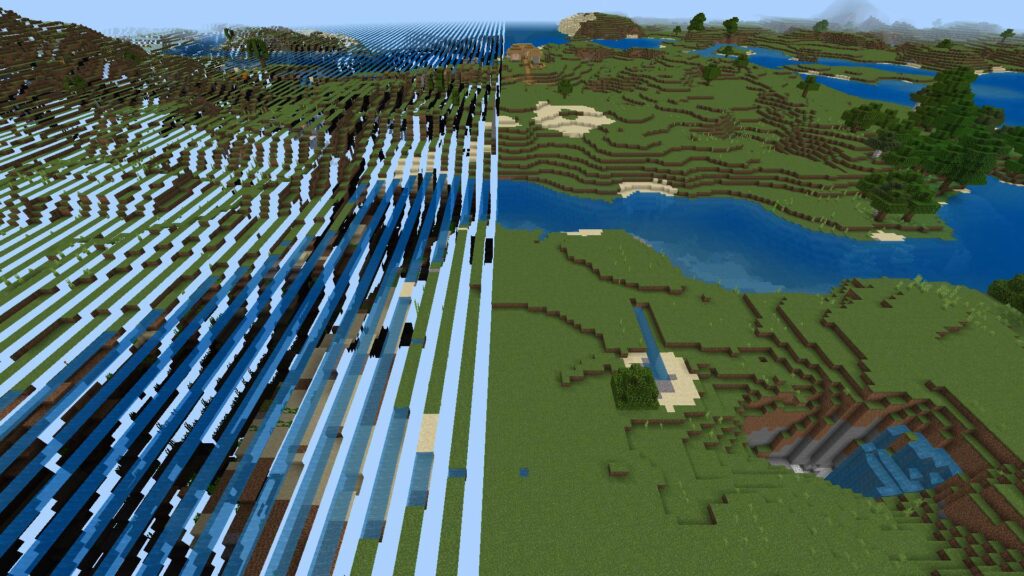
Even further out at around X/Z ±32,000,000, the game becomes unplayable, with chunks failing to render, “ghost blocks” that cannot be interacted with and frequent game crashes.
So while a Bedrock world is theoretically infinite, its playable area is limited up until the point at which its mathematics starts to fail.
A Look Back
The concept of a “Virtually Infinite” world was not always synonymous with Minecraft. Historically on platforms with hardware constraints like consoles and mobile devices, worlds were intentionally finite.
Before the 1.18 Caves & Cliffs Update, Bedrock Edition offered an “Old” world type. This was a tiny finite world measuring at just 256×256 blocks. It was a holdover from the Bedrock’s origins as Pocket Edition, where mobile devices were unable to handle the processing and storage needs of larger worlds. This option was eventually removed on most platforms as analytics showed that most players preferred the “infinitely” generated world type.
Similar to Pocket Edition, legacy console editions such as for the Xbox 360, PS3, Xbox One, PS4, Switch etc., prior to the Better Together Update, offered players a choice of fixed World Sizes. These were:
- Classic: 864 x 864 Blocks
- Small: 1024 x 1024 Blocks
- Medium: 3072 x 3072 Blocks
- Large: 5120 x 5120 Blocks
The smaller sizes of these worlds ensured a smooth and stable experience even with hardware constraints. Some players felt that these smaller worlds offered a more focused and deliberate adventure with set borders.
| Feature | Java Edition | Bedrock Edition |
| Playable Area | Stable up to ±30 million blocks (60M x 60M total) | Theoretically infinite, but becomes unstable/buggy past a few million blocks |
| Boundary | Hard-coded, impassable World Border | No hard border; world generation degrades due to floating-point precision errors |
The Vertical Axis
While the horizontal scale of Minecraft is staggering, the vertical scale isn’t quite the same, having gone through quite a few changes over the game’s lifetime.
Build Height Limit:
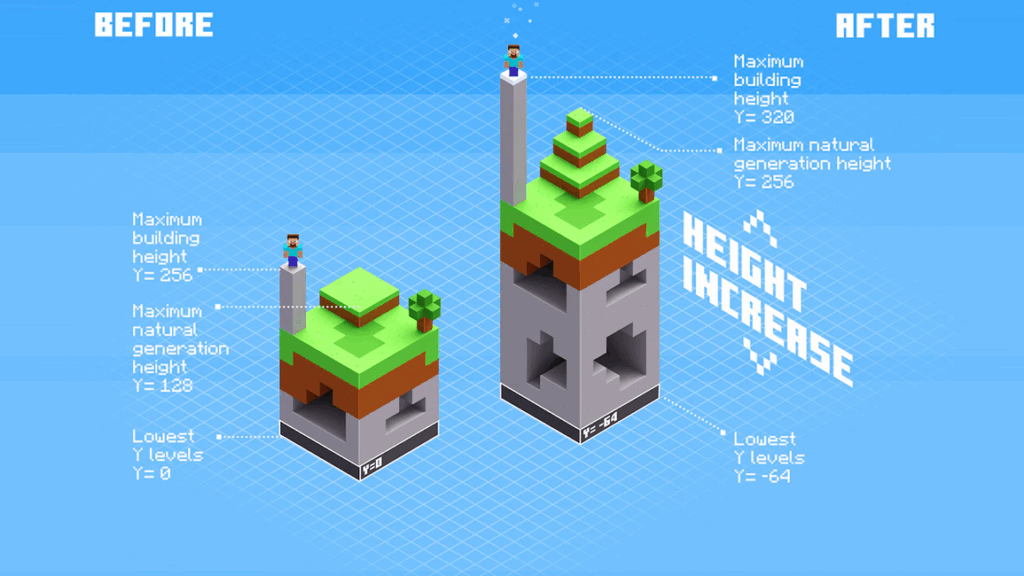
The most significant change to Minecraft’s vertical dimension was with the 1.18 Caves & Cliffs Update Part II. It expanded the total vertical range to a total of 384 blocks. The build limit was raised to a Y-coordinate of 320, and the world depth was extended downwards to -64.
This change was pretty revolutionary, for years, players complained that the world generation hardly made use of the vertical space, with most terrain peaking far below the world limit. The Caves and Cliffs update looked to resolve this by introducing majestic, towering mountain peaks that went right up to the build limit and caves that went all the way down below Y=0.
A Brief History:
The build height limit was not always Y=320, it was a long journey to get to that point. Each increase in the build limit was tied to significant changes in the game’s engine and sometimes file formats.
- Classic: In the earliest public versions of the game, the world was only 64 blocks tall, from Y = 0 to Y = 63. This was a pretty hefty restriction on both terrain generation and the potential for tall structures.
- Infdev: During the Infdev (Infinite Development) phase in 2010, the height limit was doubled to 128 blocks. This advancement was alongside the introduction of procedurally generated “infinite’ worlds.
- Java 1.2.1: The build height was doubled again to 256 blocks, an evolution made possible due to the switch from the old “Region” world format to the new Anvil format, which was specifically designed to be able to handle vertical data more efficiently. The 256 block limit remained the standard for nearly a decade.
- Java 1.18: As discussed, increased the height to Y=320, and the depth to Y=-64, requiring a massive overhaul to the world generation code.
The Minecraft Community has long since been pushing the vertical limits, using mods such as Cubic Chunks and custom datapanks to create worlds with build limits of 1024 blocks or more. Ambitious projects like “Build the Earth” which aims to recreate the entire planet on a 1:1 scale, have relied on such modifications to bypass the vanilla height limit to build realistic mountains and structures. All of this combined demonstrated that there was a clear demand for more vertical space, which likely influenced Mojang’s decision to officially expand the world height.
Dimensions:
The vertical limits are not uniform across all dimensions.
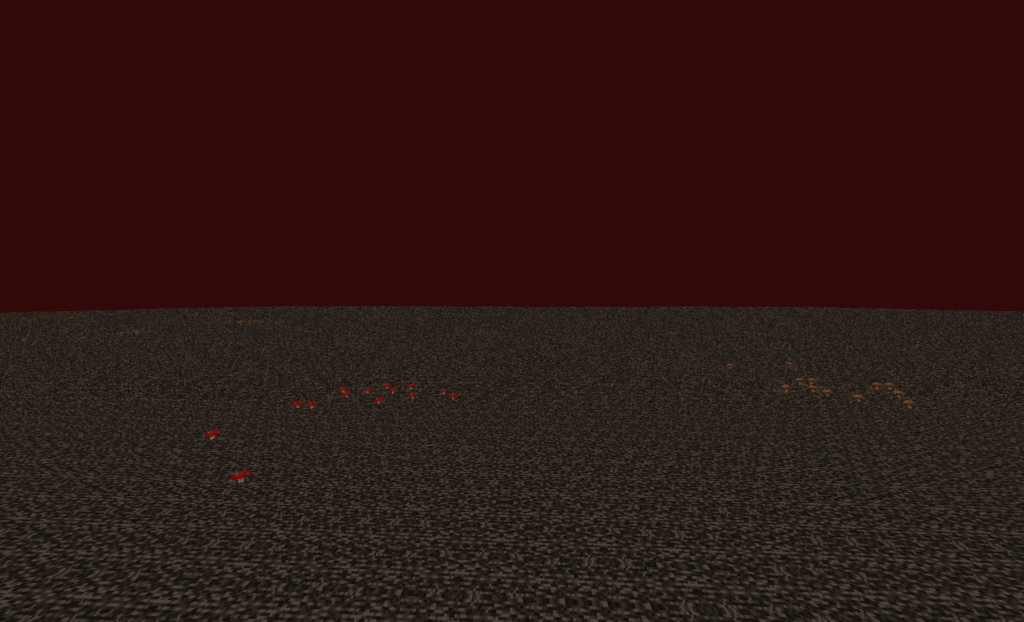
- The Nether: It has a total height of 256 blocks (Y=0 to 255), However, the playable area is limited to the lower 128 blocks, capped at the top with an impassable layer of Bedrock. Glitches and bugs can allow players to go above it and build on top of the Nether roof.
- The End: Also has a total 256 block height limit. Unlike the Nether, this dimension is composed mainly of floating Islands in a vast void.
The World Border
While Minecraft Java Edition can handle a world that is stable up to 30 million blocks wide, it is not always a good idea to let players explore the entirety of the world, especially on Multiplayer servers. To help manage this, Java Edition allows the server admins to configure the World Border using commands.
More Than Just a Wall

The World Border is a dynamic and configurable barrier through which it is possible to define the playable areas of the world. It is an animated, translucent wall of shifting blue stripes. The default location of the World Border was ±30 million blocks but it can be moved to any size or location within it. This customizability is useful for server management for a variety of reasons.
- Performance: The single biggest cause of server lag is chunk generation as players explore new places. By setting a world border, administrators can prevent players from wandering out endlessly, limiting the amount of new chunks to be rendered and thus conserving server resources like CPU and Disk Space (We will get to that in a moment).
- Limited Freedom: In Survival Multi-Player (SMP) servers, a smaller world border can limit the availability of resources and structures. This can sometimes enhance the experience by having the players work together instead of going off on their own adventures.
- Minigames: In large PvP multiplayer servers, there are often minigames that utilize the world border. Such as in “Hunger Games”, the border shrinks over time, forcing the players closer together to fight.
World Border Configuration Commands:
There are many commands that help you configure the world border. Cheats need to be enabled on the world if you are playing singleplayer and you need to be a server operator for multiplayer servers.
| Command | Example Usage | Function |
| set | /worldborder set 1000 60 | Sets the border diameter to 1000 blocks, resizing over 60 seconds. |
| center | /worldborder center 0 0 | Moves the center of the border to coordinates 0, 0. |
| damage amount | /worldborder damage amount 2.0 | Sets damage outside the border to 2 hearts (per second.) |
| damage buffer | /worldborder damage buffer 5 | Players can go 5 blocks past the border before taking damage. |
| warning distance | /worldborder warning distance 10 | The red screen vignette warning appears when a player is 10 blocks from the border. |
| get | /worldborder get | Displays the current diameter of the world border. |
Bedrock Parity Gap
The World Border and its commands are features exclusive to the Java Edition. In Bedrock Edition, there is no native equivalent. To achieve similar functionality, server operators rely on third-party software such as plugins. For players in unmodified bedrock worlds, the only way to create a boundary is to manually build a wall or use “Border Blocks”, a unique invisible, unbreakable and impassable block that is obtained using commands (similar to Barrier Blocks on Java). This solution however is not dynamic unlike Java since it was not possible to continually adjust it through commands.
The Far Lands
Before the world had a clean, defined border, it had the Far Lands. This was a legendary Minecraft bug which was for many years, the true “end” of a Minecraft world. A chaotic and surreal landscape representing the point at which the game’s code collapsed.
The Edge of the World
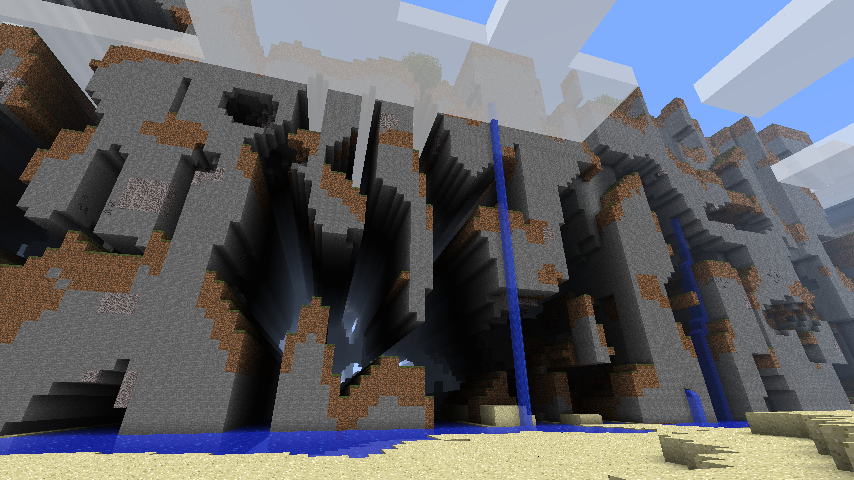
In the earlier versions of Minecraft Java Edition, before Beta 1.8, players who decided to take the journey to the edge of the map would not find an invisible wall. Instead, they would be met with a dramatic and somewhat terrifying transformation of the landscape. Starting at X/Z ±12,550,821, the normal terrain generation would break down, creating a solid and layered wall of stone and dirt that stretched from bedrock to the world limit. This was the Far Lands. Not a smooth wall, but a distorted nonsensical mess riddled with tunnels due to the cave generation giving it a cheese-like appearance. It was a tangible destination that became an attraction for many explorers.
A Technical Breakdown
The Far Lands were caused by a loss of precision in the 32-bit floating point numbers used to calculate the noise maps that made the world’s terrain.
A computer can only store numbers to a set number of digits. For very large numbers, like coordinates in the millions, a 32 bit system runs out of bits to accurately represent the fractional parts of that number. As a result, the numbers get rounded to the nearest representable value, effectively “snapping” to a grid. When these increasingly imprecise numbers are fed into the game’s Perlin Noise generator, the smooth, organic curves of the normal terrain distort into rigid and repeating patterns of the Far Lands.
The Far Lands was removed in Beta 1.8. Mojang changed the terrain generation code to fix the floating point bugs.
The Digital Footprint
Even outside the game, every Minecraft world has a physical size: The amount of space it takes up on the hard drive. This file size is highly variable and is dependent on the players’ actions. If more of the world is generated, the file will be a larger size. However, Bedrock and Java have some major differences in how they store their world data.
Anvil & LevelDB
The two editions use distinct save file formats, with Java Edition using Anvil and Bedrock using LevelDB. Anvil saves the world in regional files with the .mca extension, while LevelDB is a database format.
Java worlds are often much larger than Bedrock world when a similar amount of the map has been explored. This is because the Anvil format saves every chunk that has been generated by the game, even if the player has not done anything on it. Bedrock’s Level DB is more efficient in this respect; it only saves the chunk’s data that was changed by the player or contains generated structures. Unaltered natural terrain is not written to the save file until it is modified. This allows Bedrock players to explore a large amount of terrain while keeping the world file size relatively small.
The difference highlights the priorities of the two versions as well. Since Bedrock is run mostly on consoles and mobile devices, storage space is often quite limited. Java’s Anvil format, while less efficient, is more transparent and more accessible for third party software such as MCA Selector or MCEdit to parse and edit.
Compression
To prevent file sizes from ballooning to unmanageable sizes, both editions use zLib compression, a lossless algorithm that shrinks the data for each chunk without loading information.
The effectiveness of the compression depends largely on the complexity of the data in each chunk. Areas with low complexity, such as large uniform sections of air in the End, solid chunks of stone underground, or water in the oceans, compress very nicely and result in very small chunks of data. On the other hand, chunks with high complexity, such as player bases with chests containing lots of items, or dense forests with several different block types will not compress very effectively, taking up more disk space.
As stated before, the primary cause for file size growth is exploration; with new chunks being generated. However, player activity on existing chunks also increases size. For example, placing down torches will add lightmap data, building structures with various different blocks or filling storage systems leads to an increase in the amount of data that needs to be stored.
Estimations of Size
File sizes of Minecraft worlds can vary from a few megabytes for new worlds to tens of gigabytes for long running servers. Since it is difficult to calculate the exact size or figure out the relationship between file size and loaded chunks, it is not possible to give concrete answers. This is due to the unpredictable nature of procedurally generated worlds.
However, we can give some references. The second longest running Minecraft server and likely the most well explored world file known is from 2b2t. It is estimated to have loaded in over 3.4 billion chunks and has a world file size of approximately 58 terabytes. That is only 0.02% of the total 60,000,000 x 60,000,000 blocks of a single Minecraft world in 13 years. So a fully explored Minecraft world would likely reach hundreds of petabytes. This illustrates the real barrier in wanting to fully explore a single world. There are physical limitations on how “big” Minecraft worlds can be. Server owners use world borders and chunk trimming to keep world sizes manageable.
The Conclusion
The size of a Minecraft world is a question with many answers:
- Horizontally, it is a stable 60 million block by 60 million block expanse in Java Edition. Or a technically boundless world on Bedrock Edition.
- Vertically, there is a 384 block tall area that seems to continuously increase over time.
- Functionally, the playable area is likely going to be much smaller depending on the server operator’s preference regarding where they want to put the world border and how big they are willing to make the world size.
- Physically, the size is limited only by the capacity of the storage device it is stored on, with a theoretical maximum that reaches into petabytes.
Yet even these staggering figures cannot capture the true scale of Minecraft. A single world is generated from a single seed, a string of numbers or alphanumerics that decide the layout of the world. There are 2^64 (that’s more than 18 quintillion) possible seeds for the game. This means that while the worlds aren’t technically infinite, you are probably not going to run out of space anytime soon.