

Hosting a Rust server requires more than just hitting a button and hoping things work out. The quality of your hosting setup directly shapes the player experience. It doesn’t matter if you’re managing a small private server or a big public server, the foundation you build on makes all the difference.
Here are 10 tips to help you pick the best server hosting without wasting your time.
1. Uptime Is Essential
Source: Windows Central
For a smooth gameplay experience, your server must remain online at all times. When your server goes offline, most users will be bothered and will leave your community. So, when selecting a host, look for providers that guarantee at least 99.99% uptime and offer real-time status dashboards. This way, you’ll be immediately alerted if something goes wrong.
2. Prioritize Performance
Source: Reddit
Here’s what really matters when it comes to Rust server performance:
- High-Clock CPUs: Rust’s server performance is heavily dependent on CPU speed. The game doesn’t spread its workload evenly across multiple cores, so clock speed matters more than core count. Aim for something at 3.5GHz or higher; the faster, the better.
- Plenty of RAM: Rust can eat through memory faster than you’d expect, especially when more players join, structures are built, and plugins are added. 8GB of RAM is the bare minimum for moderate player counts, but if you plan to host a bigger community or use modded content, you’ll want 16GB or more. Having extra RAM ensures smoother world updates and prevents lag during high-activity moments like raids or restarts.
- SSD Storage (No Exceptions): Forget traditional hard drives; they just can’t keep up. Rust constantly loads and saves chunks of world data, and a fast SSD drastically reduces load times, improves world streaming, and helps keep the experience seamless. It’s also crucial for faster startup times and quicker map wipes.
If you really want to go the extra mile, look for hosts that use NVMe SSDs, have DDoS protection, and offer high network uptime. Rust’s online environment is all about real-time interaction, so any delay, whether from a slow CPU, not enough RAM, or laggy storage; can ruin the experience for players.
In short, investing in good hardware means a smoother, more stable, and overall more enjoyable Rust server. Don’t settle for the cheapest plan you find; a few extra euros a month can make the difference between a server that struggles to keep up and one that runs flawlessly, even during the most chaotic base raids.
3. Understand the Pricing
Source: Rust
When you’re choosing where to host your Rust server, it’s really important to dig into the details and understand what’s actually included in the price. Some hosting providers might look cheap at first glance, but once you start adding essential features, the costs can climb fast. Always take a close look or ask questions before committing; it’ll save you a lot of frustration later.
Here are a few key things you should check before picking a host:
- Plugin Installation Fees: If you plan to use mods or plugins (like uMod or Oxide), make sure your host supports them — and check whether they charge extra for installation or maintenance. Some hosts limit what you can install unless you upgrade to a higher-tier plan.
- Player and Wipe Limits: Always confirm if there’s a cap on player slots or restrictions on how often you can wipe your server. Certain providers may lock these settings behind paywalls or force you into a higher plan to host more players, which can be frustrating if your community starts growing.
- Extra Features and Automation: Features like automatic updates, scheduled restarts, or full file system access can sometimes come at an additional cost. While they’re optional, they make server management much easier, so it’s worth knowing upfront what’s included and what’s not.
Transparency matters a lot. Clear pricing and straightforward policies mean you won’t be hit with hidden fees or unexpected limitations later. A trustworthy host will always explain exactly what you’re getting for your money, and that’s the kind of reliability you want, especially when you’re managing an active Rust community that depends on your server staying online and stable.
4. Easy Scalability

Source: AlphaCoders
Your Rust server might start small; just a few friends building bases and exploring, but as your community grows, you’ll likely see more players joining, more structures being built, and overall higher resource demands. That’s why it’s smart to pick a hosting provider that offers easy scalability. You don’t want to hit a performance wall just because your server outgrew its initial setup.
Look for a host that allows you to upgrade your CPU, RAM, or storage without forcing long downtimes or complete reinstallations. Ideally, you should be able to boost your plan or move to better hardware with just a few clicks; no complicated transfers or hours of waiting. The best hosts handle the migration seamlessly in the background, so your players hardly notice a thing.
Also, make sure the host doesn’t require you to re-upload all your files or reinstall the server after upgrading. That’s not just time-consuming; it risks data loss and disrupts your community’s progress. Everything should carry over smoothly, from your world data and configs to your plugins and mods.
And don’t forget about flexibility in the other direction. Just as your server might grow, your needs might also scale down later; maybe the player base becomes smaller, or you switch to a more lightweight setup. A good host will let you downgrade your plan easily, so you’re not paying for resources you no longer need.
In short, choose a host that gives you room to grow and room to breathe. The best server setups are the ones that adapt to your needs, not the other way around.
5. Effective Mod Support
Source: Wallpapers.com
Since most Rust servers rely on mods and plugins to enhance gameplay and keep things fresh, having strong mod support from your hosting provider is a big deal. Mods are what make servers unique; whether it’s custom loot tables, PvE mechanics, or new game modes, they add the creativity and personality that set your server apart from the rest.
That’s why it’s worth choosing a host that makes modding simple, fast, and secure. The less time you spend managing files, the more time you can spend actually building your community and refining your server.
Here’s what to look for when it comes to mod support:
- One-Click Installations: The best hosts offer built-in mod managers or one-click installs for popular mods and frameworks. This saves you from having to manually upload and configure files every time you want to try something new.
- Secure File Access (FTP/SFTP or File Manager): Make sure the host provides full file access through either FTP/SFTP or a reliable web-based file manager. This gives you the freedom to manually edit configurations, upload custom plugins, or tweak your setup whenever you want, safely and easily.
- Automatic Updates for Mod Frameworks: Frameworks like uMod or Oxide are essential for running most plugins. Your host should make it easy to install and update them automatically, so you don’t have to worry about version mismatches or broken scripts after a Rust update.
Ultimately, having strong mod support means less hassle, smoother management, and a more enjoyable experience for both you and your players. A host that understands modding isn’t just offering convenience; it’s giving you the flexibility to create the exact Rust experience you want without being limited by technical barriers.
6. A User-Friendly Control Panel
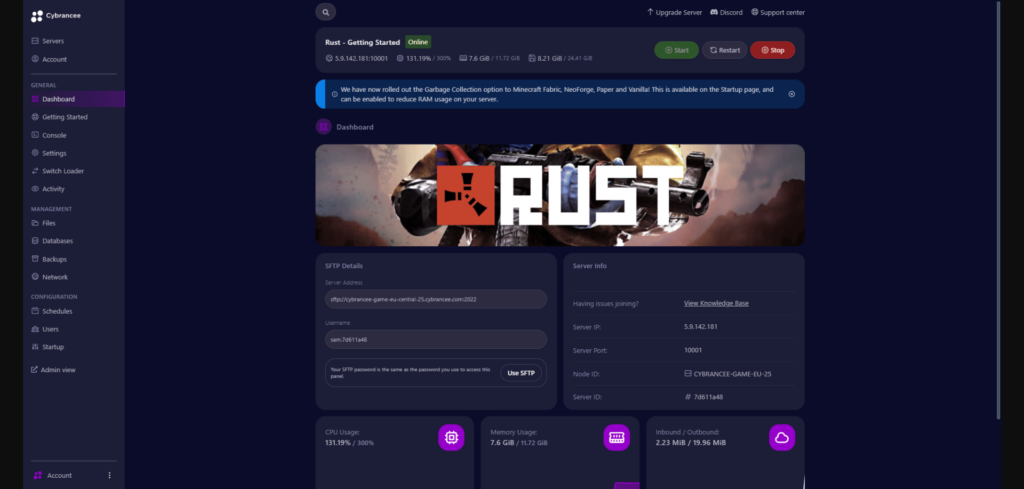
Managing your Rust server shouldn’t feel like a chore; it should be simple, efficient, and intuitive. A good control panel makes all the difference, especially when you’re handling updates, managing files, or keeping track of server activity. You don’t want to be buried in complicated menus or constantly editing configs through command lines. Instead, look for a host that provides a modern and reliable control panel, such as Pterodactyl, which is known for being both powerful and user-friendly.
Here’s what you’ll want to make sure it includes:
- Live Console and Log Viewing: Being able to monitor your server in real time helps you quickly spot issues, manage restarts, and stay informed about player activity or errors. Real-time logs also make debugging plugin problems or crashes much easier.
- Built-In File Editor: A clean, easy-to-use file editor right inside the panel saves you from having to connect through FTP every time you want to tweak a config or update a plugin. It’s fast, accessible, and convenient, especially for quick adjustments.
- Scheduling Tools: Features that allow you to automate updates, restarts, and backups are incredibly useful. They keep your server running smoothly even when you’re not around, ensuring players always have a stable and up-to-date environment.
A well-designed control panel doesn’t just make management easier; it saves you time, reduces the chance of mistakes, and keeps your server running more efficiently. Whether you’re running a small community or managing a large, active player base, having the right tools at your fingertips makes the entire experience far smoother and more enjoyable.
7. Reliable Customer Support
No matter how well your Rust server is set up, issues are bound to happen sooner or later, crashes, lag spikes, mod conflicts, or even update errors. That’s why having responsive and reliable support from your hosting provider is absolutely essential. When something goes wrong, you don’t want to be left waiting hours (or worse, days) for a reply.
Before you commit to any host, take the time to test their support and see how they handle customer questions. Here’s what you should look for:
- Test Their Responsiveness: Send a few questions before you buy, even simple ones. See how quickly and clearly they respond. Fast, helpful replies usually mean their support team is active and actually cares about their users.
- Look for Documentation and FAQs: A solid host should have a well-organized knowledge base, setup guides, and FAQ pages that walk you through common problems or configurations. Good documentation saves you time and shows that the company knows its product inside out.
- 24/7 Assistance: Make sure they provide round-the-clock support, preferably through live chat or a ticket system. Rust servers run all day, every day, and problems can happen at any time. Having help available whenever you need it keeps downtime to a minimum.
At the end of the day, good support can make or break your hosting experience. When things go wrong, having a team that responds quickly, knows the platform, and genuinely wants to help can get your server back online faster and keep your community happy.
8. Regular Backups
Backups are your lifeline when something goes wrong, whether it’s an accidental deletion, file corruption, a bad plugin update, or just an unexpected crash. Losing progress or data can be devastating, especially if you’ve built an active community and spent hours customizing your Rust server. That’s why having a solid backup system isn’t optional; it’s a must-have feature.
When choosing a hosting provider, make sure they offer reliable and flexible backup options to keep your data safe, no matter what happens. Here’s what to look for:
- Scheduled Automated Backups: Ideally, your host should automatically create backups on a set schedule, daily or weekly, without you having to lift a finger. This ensures that even if something goes wrong unexpectedly, you’ll always have a recent restore point to fall back on.
- Manual Backup Options: Before making major updates, adding new plugins, or changing configurations, it’s extremely helpful to be able to manually trigger a backup. That way, if anything breaks, you can revert to the previous state instantly.
- One-Click Restore: Restoring from a backup should be quick and effortless, just a single click to roll everything back to a working version. The best hosts make this process smooth and safe, minimizing downtime and frustration.
It’s also smart to keep your own local copies of backups on personal storage or cloud drives. Even if your host provides great backup tools, having your own set ensures you’re fully protected against any server-side issues or provider failures.In short, a dependable backup system gives you peace of mind. It’s your safety net that keeps your progress, community, and hard work secure, no matter what unexpected problems come your way.
9. Choose a Suitable Server Location
Your server’s location plays a huge role in how well your Rust server performs; not just for you, but for every player who joins. The closer the server is to your main player base, the lower the latency (ping), which means smoother gameplay, faster response times, and fewer frustrating delays during combat or building. Even a few milliseconds can make a noticeable difference in Rust, especially when it comes to PvP or large-scale raids.
When choosing your hosting provider, always check where their data centers are located, and pick one that’s geographically close to your community. Most good hosts let you choose your server’s region during setup, so take advantage of that to ensure the best experience possible.
Here are some ideal server locations based on region:
- For Europe: Look for data centers in Amsterdam, Frankfurt, or Paris. These cities are known for their excellent network infrastructure and provide stable, low-latency connections across most of Europe.
- For North America: Choose servers on either the East Coast (New York, Virginia) or West Coast (Los Angeles, Seattle), depending on where most of your players are located. This helps keep ping consistent and gameplay smooth across the region.
- For Asia: Great options include Singapore, Tokyo, or Seoul, as they offer strong connectivity and fast network speeds for players throughout Southeast and East Asia.
If your community is more global, consider going with a host that supports multiple regions or cross-region transfers, so you can expand later without starting over.
In short, picking the right server location is one of the simplest yet most impactful ways to boost performance and player satisfaction. The closer your players are to the server, the better their experience, and the more likely they’ll stick around.
The closer your server is to your players, the better their gaming experience will be.
10. Listen to the Community
One of the smartest things you can do before choosing a Rust server host is to learn from the experiences of other server owners. There’s no better insight than hearing directly from people who’ve already tested different providers, dealt with their support teams, and experienced their uptime firsthand. Real-world feedback can save you from wasting time and money on unreliable hosts that look good on paper but fail in practice.
Here’s where to start your research:
- Reddit Communities: Check out places like r/playrustservers and r/rustadmin, where server owners share their setups, reviews, and recommendations. You’ll often find honest discussions about which hosts perform well and which ones to avoid.
- Rust Discord Servers: Many Rust-focused Discord communities have channels dedicated to server hosting and management. These are great for asking specific questions, getting live feedback, or even finding other admins who can share firsthand experiences.
- Review Sites: Take a look at TrustPilot, ScamAdvisor, or similar platforms to see how each hosting company is rated. Read through both the positive and negative reviews; the way a company responds to criticism can tell you a lot about how they handle support and reliability.
Pay close attention to recurring complaints, such as frequent downtime, slow responses from support, hidden fees, or unstable performance. If multiple users mention the same problems, that’s a red flag.
Real feedback from actual Rust server admins gives you a clearer, more trustworthy picture than marketing pages ever will. By doing a bit of research upfront, you’ll avoid bad experiences and find a host that delivers consistent performance, fair pricing, and dependable service, all crucial for running a great Rust community.
Summary
Choosing the right hosting provider is essential for running a smooth and stable Rust server. Here’s a quick recap of the most important points.
- Uptime and Performance: Ensure your server remains online with powerful hardware.
- Transparent Pricing: Understand all fees upfront.
- Scalability: Choose a provider that grows with you.
- Mod and Control Panel Support: Look for easy mod management and a user-friendly interface.
- Responsive Support and Backups: Reliable assistance and regular backups are a must.
Appropriate Server Location and Community Feedback: A nearby server location and insights from other admins can guide your decision.
Happy crafting!