

When starting a Minecraft server with your friends or a community with tens or hundreds of players, you need to decide how to host your Minecraft server. There are two popular options for hosting your server. You can pay for a Minecraft Realm, or you can run the server yourself on your own computer.
While both options have their strengths, they solve different problems. Realms are more convenient, but you have less control over your server. Self-hosting gives you more control, but is limited by how well your PC performs. There’s also another option, which is using a server hosting provider.
In this guide, we’ll break down what each option is, what the strengths of each option are, the downsides, and how to decide which is worth it.
What is Minecraft Realms?
Minecraft Realms is a server hosting service offered by Mojang, and it’s built directly into Java and Bedrock editions. Both editions operate Realms differently, but they both include 24/7 access to the server and cross-platform play on the edition it’s bought on. For example, on Bedrock Edition, friends who are on mobile, Nintendo Switch, and other Bedrock Edition devices can all join the server.
In addition, they both feature free backups and three world slots. The world slots allow you to switch between worlds, but only one world can be playable at a time.
Minecraft Realms on Bedrock Edition
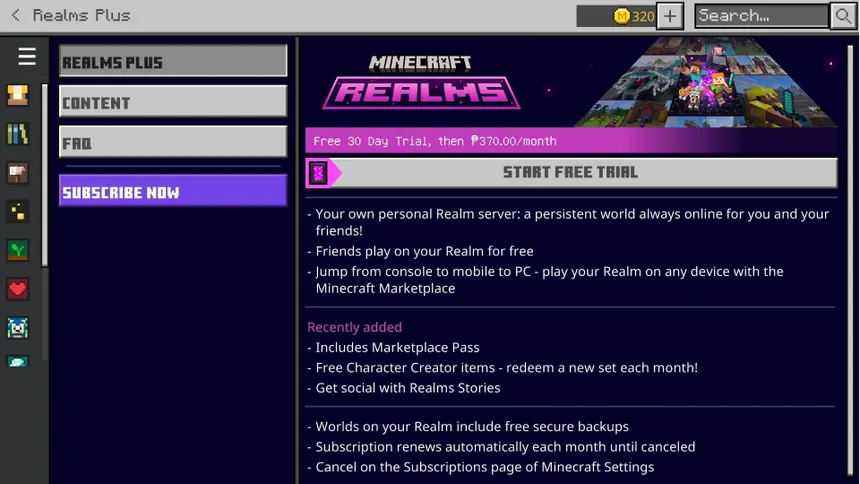
Minecraft Realms on Bedrock Edition features two plans, the core and the Plus plan. The core plan costs $3.99/month, while the Plus plan costs $7.99/month.
The core plan only allows you and up to two friends to be online concurrently. The Plus plan allows up to ten friends to be online concurrently. The Plus plan also includes the Marketplace Pass, which gives you access to add-ons, skins, and texture packs at no extra cost.
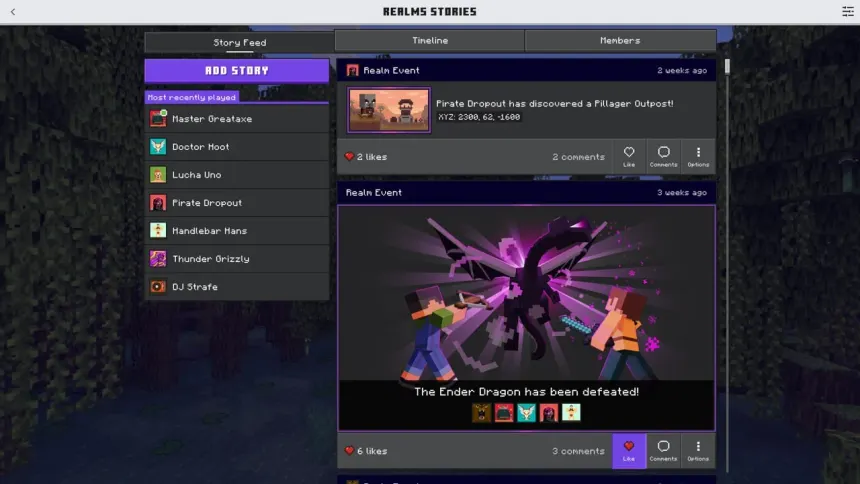
You can also take advantage of Minecraft Realms stories (exclusive to Bedrock Edition realms). With stories, you can share what you have been working on, accomplishments, and more with everyone who is a part of the Minecraft realm. Plus, whenever a big event happens in the world, such as defeating the Ender Dragon, a Realm event will appear in the feed to let everyone know what happened.
Another minor feature included is the timeline. You can see who was active on the realm, which is really helpful if you are planning a realm-wide event, for example.
If you are unsure about Minecraft Realms, you can get a 30-day free trial to test the service as long as you are a new subscriber.
Although Realms is a convenient option, it’s not a solution for everyone. There are multiple drawbacks to owning a Minecraft Realm.
Even with the Plus plan, you’re limited to you and ten players concurrently online. If you have a friend group larger than that, a realm won’t be able to support everyone at once.
You also cannot install plugins (other than Minecraft’s add-ons you can find in the marketplace) or make changes to the server’s core configuration files. What you see in the settings menu is what you are working with.
Minecraft Realms for Java Edition
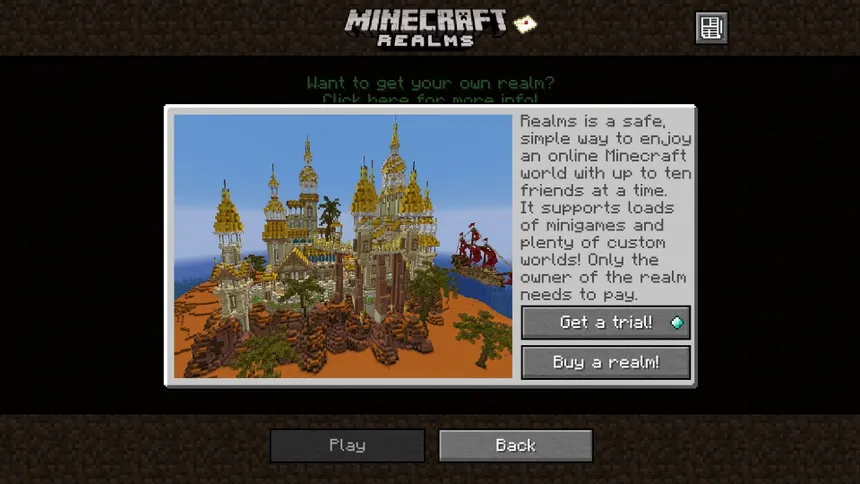
Minecraft Realms for Java Edition only features one plan, which is $7.99/month. As with Bedrock Edition realms, you can have up to 10 friends online concurrently. You can only invite players to your realm who have Java Edition, so players on consoles, mobile devices, or similar cannot join your realm.
Most features from Bedrock Edition realms also carry over to Java Edition realms. For example, you get access to three world slots, a 24/7 online world, and automatic backups.
However, there are many features included in Bedrock Edition realms that are not included in Java Edition realms. The Marketplace Pass and Realms stories are not included in Java Edition realms. Java Edition Realms also do not support mods or plugins.
What is self-hosting?
Self-hosting your Minecraft server means you run the Minecraft server on your own PC. You download the Minecraft server software of your choice, run it, and share your IP address with your friends. As long as your PC is on and the server is running, and you set up port-forwarding correctly, people can join your server and play on it.
Self-hosting can work well if you are hosting a small survival world with two or three of your friends who all play online at the same time as you.
There are also many drawbacks to self-hosting your Minecraft server. A huge drawback is that since you’re hosting on your computer, if you shut it down, your server will also shut down and kick everyone off your server. No one will be able to rejoin until you turn on your computer and restart the server. If you wanted to keep your server online 24/7, your computer has to run 24/7, which in the majority of cases is not possible.
Another large issue is performance. Since your internet’s upload speed has to carry the player connections, and most residential internet connections aren’t built or optimized to do that, your server may lag a lot. Plus, your computer’s hardware may be affected, as running a server through your computer is CPU-intensive.
Finally, there is your server’s security. To connect to the server, you must use your IP address. Since your IP address is exposed, you are more at risk of DDoS attacks and other cyber attacks.
Best Choice: A Minecraft Server Hosting Provider
A server hosting provider, such as Cybrancee, runs your server with professional hardware in a data center instead of on your PC. It stays online 24/7 without your PC having to be online constantly. You can also install server plugins, add mods or modpacks, edit the server configuration files, and pick which server software you want. Plus, most providers, such as Cybrancee, have a one-click installer built into their control panel to make it easy to download and install the mods and plugins you want for your server.
Note that not every hosting provider is the same. Make sure you consider the hardware specs the provider uses, whether they include DDoS protection, and how long the refund window is.
When choosing a hosting provider, we recommend choosing Cybrancee. In addition to the above, Cybrancee has the most powerful hardware to run your Minecraft server. They use Ryzen CPUs that clock in over 4GHz, which is faster than most hosting providers. Each server also includes DDoS Protection to keep your server safe and secure. Plus, they have a 90-day money-back guarantee. You are able to test the service out, and if you are not satisfied with your Minecraft server, you can get a refund. Most providers usually have a 48-hour to a two-week money-back guarantee.
Hosting your server with a hosting provider also costs less than Minecraft Realms. Cybrancee’s plans start at $1.99/month, below the price of a basic Bedrock Realm subscription.
Minecraft Realms vs. Self-Hosting vs. Hosting Provider
Here’s how the options compare.
| Realms | Self-Hosting | Hosting Provider | |
| Cost | $3.99/month – $7.99/month | Free (dependent on PC runtime plus electricity) | From ~$2/month, scales with RAM usually |
| Player limit | Up to 10 + you | Limited by your PC and internet | Not capped, but limited by server RAM |
| Online 24/7 | Yes | Possibly, if your PC runs 24/7 | Yes |
| Plugins | No | Yes | Yes |
| Java mods and modpacks | No | Yes | Yes |
| Edit server files | No | Yes | Yes |
| Adjusting server RAM | No | Limited to your PC | Yes |
| Setup difficulty | Very easy | Hard | Easy |
Which should you pick?
There is not a single best option for everyone. It depends on who you are playing with and what you want from your server.
If you are playing with just a few friends and want minimal setup, Minecraft Realms may work for you. It’s the easiest way to get all players of the same edition into the same world. For example, inviting six friends on consoles and phones to all share a single world.
Self-hosting may work if you want to test out plugins or mods with friends or run a small Minecraft server.
However, in most cases, a hosting provider may work best for you. You can add plugins, mods, or modpacks to your Minecraft server. Your server will also stay online 24/7, and it includes DDoS protection to keep your server safe from malicious attacks.
Frequently Asked Questions
Can I move my Realms world to a server?
Yes. In both editions of Minecraft Realms, you can download a backup of the world. Once you have the world file, you can upload it to your Minecraft server and start playing where you left off. Builds, inventories, and progress will carry over.
How much RAM does my server need?
This depends on your expected player count and what you’re running on your server. A smaller server that is only vanilla Minecraft or has a few mods installed usually works well on 2-4GB. Larger communities, servers with multiple plugins, and modpacks usually need 6-8GB or more. If you’re unsure how much RAM you’ll need, start with a smaller amount of RAM and then upgrade if needed. You can also use Cybrancee’s free Minecraft RAM Calculator to better estimate how much RAM your server may need. For more information on how much RAM your server might need, check out how much RAM you need for your server.
Can Java and Bedrock players play on the same server?
Not on Minecraft Realms. Java Realms and Bedrock Realms are separate and do not support different edition cross-play, only cross-play with the edition where the realm is. However, on a self-hosted or a provider-hosted Minecraft server, you could install a plugin called Geyser, which lets Bedrock players join alongside Java players. Note that console players on Xbox, PlayStation, and Nintendo Switch will have to go through extra steps to connect to custom servers, as adding a custom server on console versions of Minecraft is not supported. It’s also recommended to install Floodgate alongside Geyser, which will allow all Bedrock players to join without requiring a Minecraft Java Edition account. For more information on how to set up the Geyser plugin, check out how to get Minecraft Java and Bedrock Edition to play together in the same world.
Is self-hosting really free?
Not really. You aren’t paying a hosting company, but you are paying for the electricity to keep your server running. You also will have to spend time maintaining your server and keeping it secure (since your IP address is exposed to players). If your server needs to stay online all the time, it’s better to use a hosting provider such as Cybrancee instead of self-hosting.
Summary
Minecraft Realms and self-hosting your server each solve different problems, and neither one is a perfect solution.
Minecraft Realms is more for convenience. Depending on your plan and edition you’re buying your realm from, for about $3.99 to $7.99 a month, your world will stay online 24/7, your world will automatically be backed up, and everyone on the edition the realm is purchased on can join your server. However, you are allowed only up to 10 friends online at once, and you cannot add plugins/mods or edit the server configuration files.
Self-hosting your Minecraft server gives you more control. You can choose the server software, install any plugins or mods you want on your server, and can change every setting on your server. However, performance heavily depends on how powerful your computer is and your home internet. Plus, your server will automatically go offline when your computer goes offline, and you will expose your home IP address.
The best option would be to host your server with a hosting provider, such as Cybrancee. You are given a server with options for server software, plugins, mods, and more. Plus, you get a server control panel to easily configure everything you want on your server.
If you want a Minecraft server for your friends or family, or a public server to grow your community, choose Cybrancee’s Minecraft Server Hosting. Cybrancee offers exceptional hosting with a generous 90-day money-back guarantee.
Happy Gaming!