




What Should I Look for When Buying Rust Hosting?
Choosing a Rust server host isn’t just about finding the lowest price. To get stable performance, low latency, and a smooth experience for your players, here are the key features to watch for:
24/7 Support: Running a Rust server can get technical quickly. You might need help configuring mods, fixing crashes, or recovering from a bad wipe. A host with responsive 24/7 support is essential for quickly resolving issues.
High-Performance Hardware: Rust is a CPU-intensive game, especially with lots of entities or players online. Look for hosts using modern CPUs (like Ryzen 5000 or Intel i7/i9 series), at least SSD storage (preferably NVMe), and sufficient RAM for your player load. Avoid hosts still using HDDs or underpowered VPS plans.
DDoS Protection: Popular Rust servers are common targets for DDoS attacks. To protect your uptime and avoid frustrating disconnects, pick a host that includes strong DDoS protection at no extra charge.
Custom Control Panel or Full FTP Access: You want control over your server settings, save data, map files, and mods. A good control panel or at least full FTP access is a must if you want flexibility or plan to run events, change maps, or manage backups.
Scalability: As your player base grows, so will your resource needs. Choose a provider that allows you to easily upgrade without migrating everything to a new machine.
Recommended Specs by Player Count
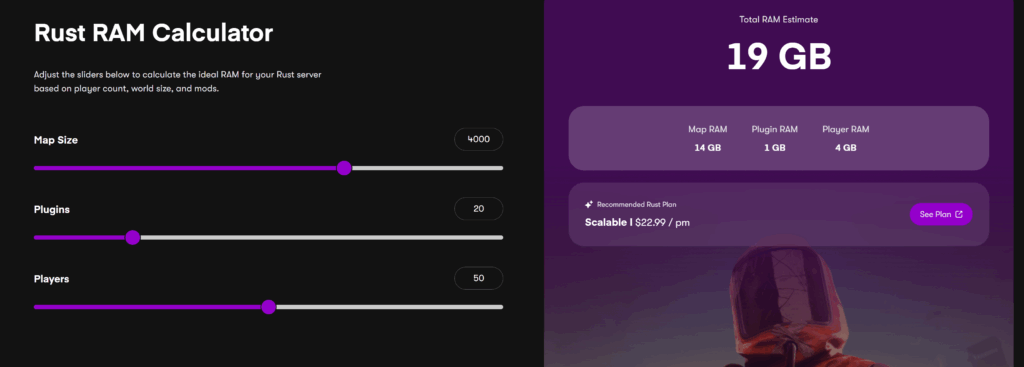
Not sure how much RAM you need? Use the Rust RAM Calculator by Cybrancee to estimate your server requirements.
Pricing Comparison – Lowest to Highest (Starting Monthly Price)
Cybrancee – from $11.99/month
Shockbyte – from $14.99/month
GTXGaming – from $18.87/month
BisectHosting – from $17.99/month
Pine Hosting – from $14.99/month
Here’s a quick breakdown of entry-level pricing from the most popular Rust hosting providers, sorted from lowest to highest.
What Specs Do You Actually Need to Host a Rust Server?
Rust is a CPU-heavy game, especially with more players, bases, and AI on the map. RAM helps, but high CPU clock speeds make the biggest difference.
Minimum Rust Server Requirements:
CPU: 3.4GHz or higher, quad-core (preferably high single-core performance such as Ryzen 5 3600 or Intel i5 and above)
RAM: 6 to 8 GB for vanilla, 12 to 16 GB for modded servers.
Storage: SSD only.
Bandwidth: 100 Mbps or higher.
CPU vs RAM – What Matters More?
Rust servers depend more on CPU power than RAM. Tickrate, AI behavior, physics, and base simulation are all CPU-intensive tasks. However, RAM becomes essential when:
– Running large maps
– Hosting more than 100 players
– Using lots of mods or custom entities
1. Cybrancee – Best Value & Performance Hosting
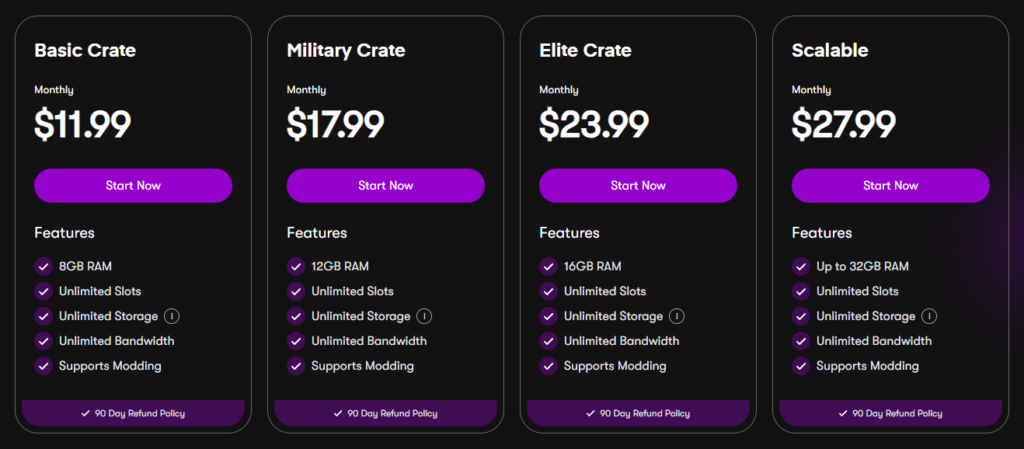
Cybrancee has earned a reputation as one of the most reliable Rust server hosts in 2026. With affordable pricing, fast server setup, and performance-optimized hardware, it’s ideal for both small and large Rust communities.
Key Features:
– Instant setup
– DDoS protection
– Clean web control panel and full FTP access
– Supports mods/plugins like Oxide and Carbon
Pros:
– Very affordable.
– Unlimited Slots.
– Excellent price-to-performance ratio.
– Beginner-friendly setup.
– Quick customer support via website.
– Community support via Discord.
Cons:
– Still growing, fewer advanced features than other hosts.
Best for: No fuss Rust hosting with global reach and good performance.
2. Pine Hosting – Clean Panel with Strong DDoS Protection
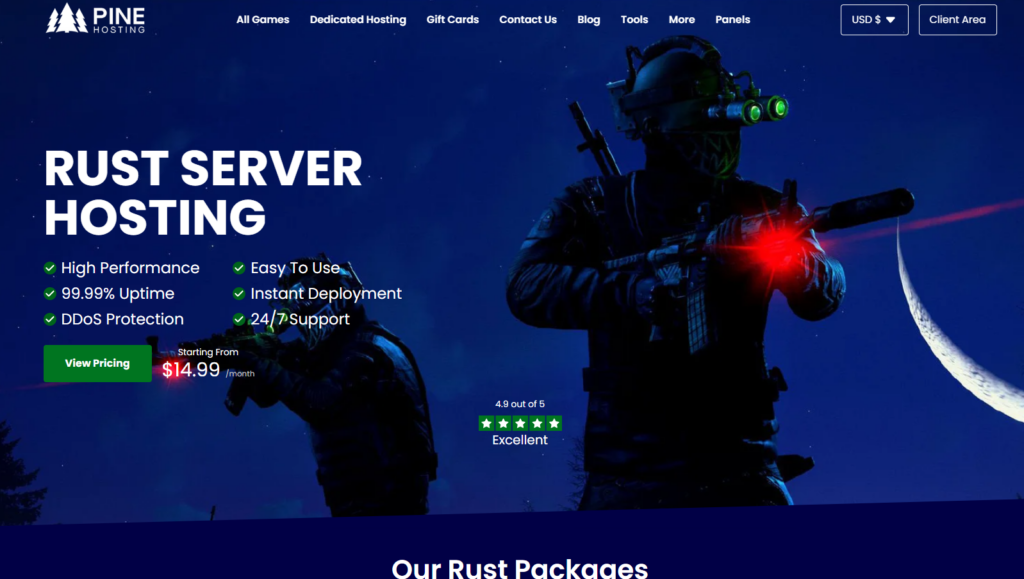
Starting at $14.99/month (50 Slots | 8GB RAM)
Pine Hosting is one of the top names in Rust hosting, with a 4.9/5 rating on Trustpilot and a steady stream of strong reviews from people who actually run their servers there. Support is on hand 24/7, and they’re quick to respond when you need them. Everything runs on modern hardware with DDoS protection included as standard.
The real standout is their custom game panel, built specifically for Rust admins. It handles wipe scheduling, one-click Oxide and Carbon installs, plugin management and a simple config editor, and you can get to all of it from any device.
Key Features
– One-click Oxide and Carbon installation
– Built-in wipe scheduling
– Anycasted DDoS protection (multi-terabit capable)
– Plugin installer and file manager
– Instant server deployment
– 99.99% uptime guarantee
Pros:
– Rust-focused custom panel with wipe scheduling built in
– Anycasted DDoS protection — stronger than most competitors
– High Trustpilot rating (4.9/5)
– Generous RAM on entry plan (8GB at $14.99/month)
– 24/7 support from developers and experienced server owners
Cons:
– More expensive than Cybrancee for comparable specs
– Fewer server locations than larger providers
– Best For: Rust server admins who want a panel built specifically for Rust, with wipe scheduling and strong DDoS protection as standard.
3. GTXGaming – Highly Customizable and has many features.
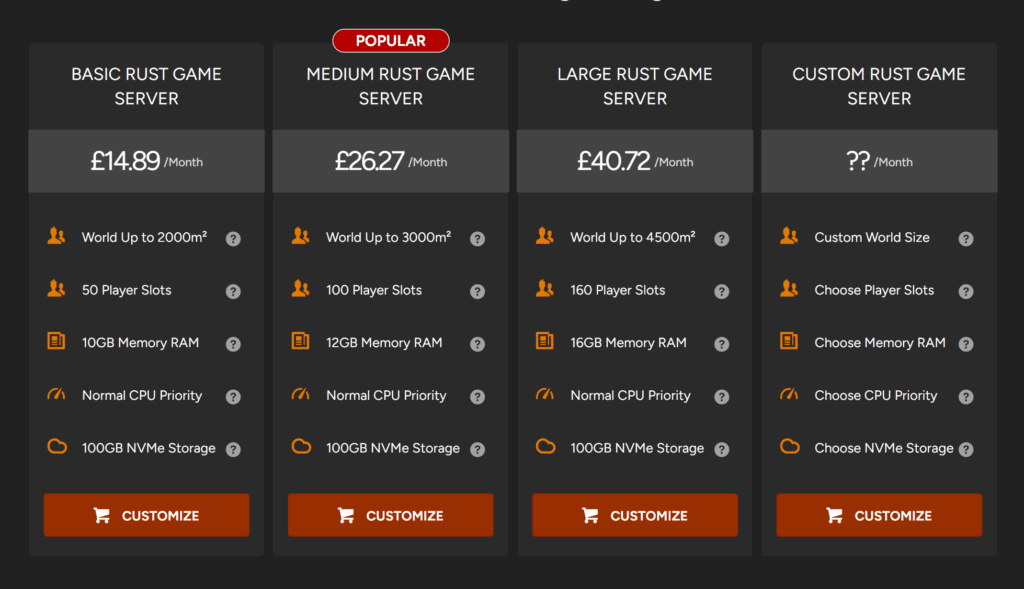
GTXgaming is a veteran in game hosting and provides one of the most customizable Rust server setups available. With powerful automation tools and deep config options. It’s made for admins who want total control.
Key Features
– One-click mod/plugin installation
– Scheduled updates, wipes, and restarts.
– Global data centers and high-performance hardware.
Pros:
– Feature-packed control panel
– Great for advanced configurations and large communities
– Long-standing reputation and proven uptime.
Cons:
– Learning curve for new users.
– Slightly more expensive than newer providers.
Best for: Experienced server Admins and communities that require full customization and robust tools.
4. BisectHosting – Reliable Performance with Strong Mod Support
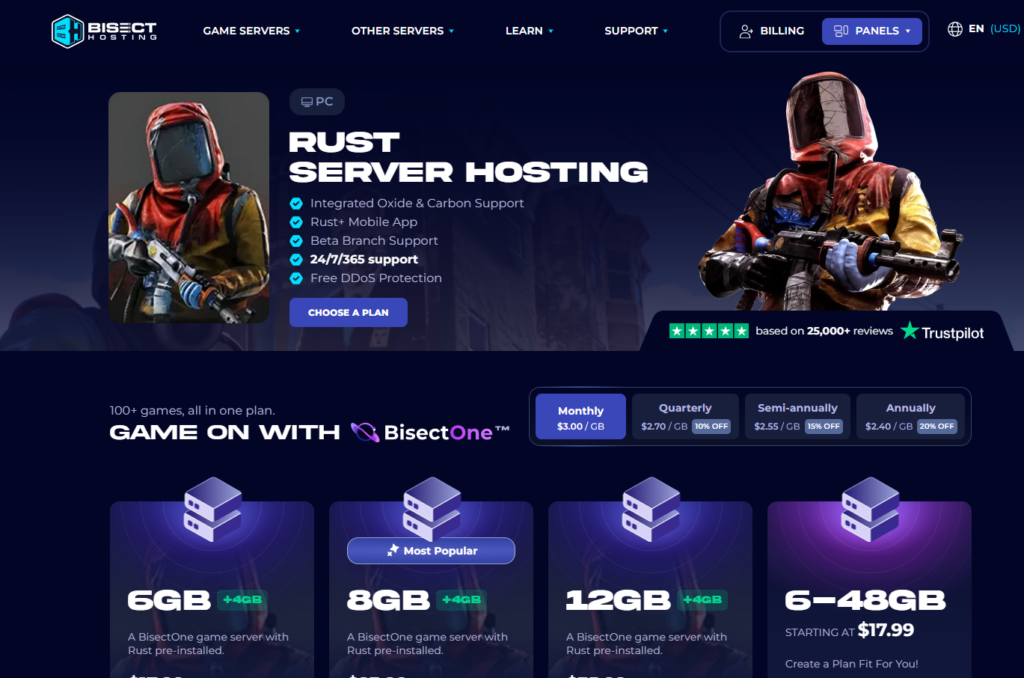
Starting at $17.99/month (6GB RAM, 1–32 players)
BisectHosting is a well-established host that covers all the Rust essentials cleanly. With integrated Oxide and Carbon support, Rust+ mobile app compatibility, and 21 worldwide server locations, it’s a solid option for groups wanting a familiar, well-reviewed provider.
Key Features:
- Integrated Oxide and Carbon mod support
- Rust+ mobile app support
- Free DDoS protection
- 21 worldwide server locations
- Full FTP access
- 24/7/365 support
Pros:
- Strong mod support out of the box
- 21 global server locations
- Responsive and well-reviewed support team
- Swap between 100+ games on one plan
- Clean, easy-to-use panel
Cons:
- More expensive per GB than Cybrancee
- Only 3 days of free backups
- Very short refund window
- Pricing scales steeply for larger servers and world sizes
Best for: Players who want reliable Rust hosting with strong built-in mod support and don’t mind paying a bit more for it.
5. Shockbyte – Budget Hosting with Good Uptime
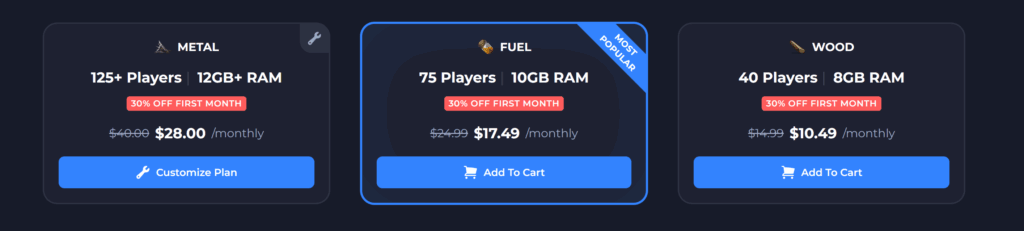
ShockByte is a go-to name in game hosting. While it doesn’t have all the bells and whistles of premium providers, it covers the basics well and makes getting a Rust server online fast and easy.
Key Features:
– 99 percent uptime
– Plugin support and DDoS protection
– Full FTP and console access
– Instant deployment and backup support
Pros:
– Great for small private servers
– Reliable uptime record
– Modern Panel
Cons:
– Limited support depth.
– Fewer advanced configuration features.
– High prices.
– Poor reviews.
Best For: First-time server owners or players looking for budget hosting with essential features.
Key Features:
- One-click Oxide and Carbon installation
- Built-in wipe scheduling
- Anycasted DDoS protection (multi-terabit capable)
- Plugin installer and file manager
- Instant server deployment
- 99.99% uptime guarantee
Pros:
- Rust-focused custom panel with wipe scheduling built in
- Anycasted DDoS protection — stronger than most competitors
- High Trustpilot rating (4.9/5)
- Generous RAM on entry plan (8GB at $14.99/month)
- 24/7 support from developers and experienced server owners
Cons:
- More expensive than Cybrancee for comparable specs
- Fewer server locations than larger providers
- No refund policy mentioned
Best For: Rust server admins who want a panel built specifically for Rust, with wipe scheduling and strong DDoS protection as standard.
Final Thoughts:
No matter the size of your Rust community, having the right host makes all the difference. Whether you’re looking for affordability, deep customization, or massive player support, these providers cover all the bases.
Top Pick: Cybrancee.com – Best overall value and performance with unlimited slots at no extra charge.