

You’ve got a world, a few friends, and a fresh server jar. Then the question every server owner hits sooner or later shows up: how much RAM does this thing actually need? Ask ten people, and you’ll get ten different answers, usually somewhere between “1 GB per player” and “just buy 32.”
The honest answer depends on what you run. A vanilla server for a handful of friends is happy on 3 to 4 GB. A plugin server with a growing community wants more, and a kitchen sink modpack can chew through 10 GB before the first player even joins.
Here’s what Minecraft servers need in 2026, what changed this year (Java 25 is the big one), and how to land on a number without guessing.
The Short Answer
Mojang’s own baseline for the vanilla server process is 1 GB, but almost nobody runs a real server on that. Community and hosting guides agree on three rough tiers: 3 to 4 GB for about 10 vanilla players, 6 to 8 GB for small modded or plugin servers (around 20 to 30 players), and 10 to 16 GB or more for big public servers and heavy modpacks.
The part people miss is that RAM follows the world and its features, not the player count. View distance, loaded chunks, mods and plugins all matter more than how many names are in the tab list. CPU speed often matters more than core count, and fast storage helps with chunk loading.
In practice, size your heap for what the server loads at startup (mods and plugins, plus a buffer for players) and leave headroom for the operating system. Set -Xms equal to -Xmx, then watch TPS and memory use. Raise the number only when you actually hit the ceiling.
History of Server RAM Usage Trends
In the Alpha and Beta days around 2009 and 2010, servers were tiny by today’s standards and ran on machines with 256 to 512 MB. By the 1.0 release in 2011, Minecraft’s own docs pointed to -Xmx1G as a starting point. New dimensions, biomes, redstone contraptions, and bigger worlds pushed community advice upward from there, and by 2016 Minecraft Wiki guidance said 4 GB comfortably handled 10 or more vanilla players.
2026 shook things up more than usual. Minecraft moved to year-based version numbers, so 26.1 “Tiny Takeover” arrived on March 24 as the first release to require Java 25. 26.2 “Chaos Cubed” followed on June 16, and 26.3 “Wilderness Bound” landed in September. A 26.x server jar will not start on Java 21, though older Minecraft versions run fine on a newer Java.
Then there’s the July 21 announcement that confuses people. Mojang raised the official Java Edition system requirements for the first time in 17 years: 8 GB minimum and 16 GB recommended, up from 4 GB. That number is for the player’s PC, not your server heap. Mojang said it was mostly the documentation catching up with reality. Server advice hasn’t jumped the same way, and small setups still cluster around 3 to 8 GB.
Bedrock servers stay lean: about 1 GB for a small world and 4 to 6 GB for 25 to 50 players.
Server Performance and Resource Usage
A Minecraft server leans on four things, and each one plays a different role.
CPU. The game loop runs 20 ticks per second, and most of that work happens on a single core. When a tick takes longer than 50 ms, you get the dreaded “Can’t keep up!” message. Paper can push some jobs like chunk generation and networking onto other threads, but the core tick stays single-threaded. That’s why clock speed beats core count.
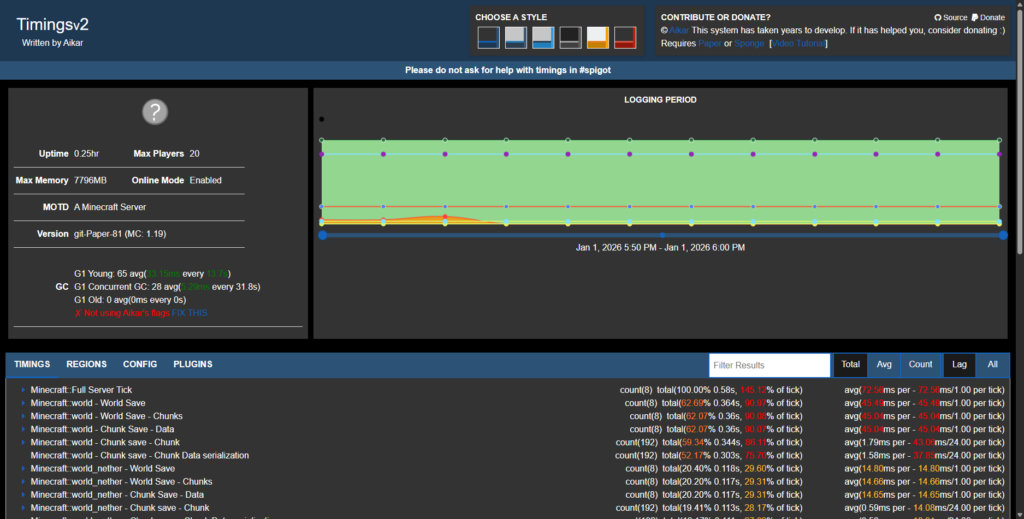
RAM. Memory holds loaded chunks, entities, and mod data. Too little means crashes or constant garbage collection. Paper’s docs cite roughly 800 MB per second of short-lived allocations at 30 players. As a rough starting estimate from hosting data, count 1 to 1.5 GB for the server itself, about 0.25 GB per active vanilla player, about 0.5 GB per 10 mods or plugins, and 1 to 3 GB of headroom for exploration. Keep another 1 to 1.5 GB free for the OS beyond your -Xmx.
PaperMC’s own docs set a higher bar. They recommend at least 6 to 10 GB no matter how few players you have, because the G1 garbage collector works better with more memory. A private vanilla server for friends can get by on less, but a public Paper server with plugins is better off starting at 6 GB or more.
Disk. Fast storage helps when the world saves or generates new chunks, and NVMe drives noticeably cut chunk-load lag during exploration. Once the world is loaded, though, disk speed has no effect on tick rate.
Network. Minecraft is light on bandwidth. About 20 players need only a few megabits, and even dozens of players usually stay under 10 Mbps. Public servers should care about DDoS protection.
CPU tick speed and a sensible amount of RAM decide whether you sit at a steady 20 TPS. Disk and network mostly affect chunk loading and connections.
RAM Recommendations
Treat these as starting points, not promises.
| Scenario | Players | Mods/Plugins | Recommended RAM | Notes |
|---|---|---|---|---|
| Single-player/LAN | 1 to 3 | None or few | 2 to 4 GB | Client and server share one PC, so the machine needs 8 GB or more overall. |
| Small vanilla SMP | Up to 10 | Few | 3 to 4 GB | 4 GB handles about 10 clustered players. Closer to 6 GB with plugins. |
| Small plugin server | 10 to 25 | 20 to 30 light plugins | 6 to 8 GB | Plugins add roughly 0.5 GB per 10. |
| Medium server | 25 to 50 | Many plugins or small mods | 8 to 12 GB | Exploration pushes this toward 10 GB. |
| Large public/proxy | 50 to 200 | Varies | 12 to 32 GB (split) | Use a proxy with multiple backend servers, about 12 to 16 GB each. |
| Minigame/hub | Dozens to 100+ | Varies | 16 to 32 GB (network) | Many small worlds, arenas and NPCs add up. |
| Light modded | 5 to 20 | 20 to 50 mods | 6 to 8 GB | Handles about 10 players well. Go to 8 to 10 GB for more. |
| Heavy modded | 10 to 20 | 100+ mods | 10 to 16 GB | Kitchen sink packs need 10 GB even for 10 players. |
| Bedrock | Up to 50 | None | 1 to 6 GB | 2 GB covers about 10 players. |
| Enterprise | 100+ | Many | 32+ GB (clustered) | 16 to 32 GB or more per node. |
Hosting benchmarks agree: 6 GB suits most 50-mod packs and 10 GB is the floor for heavy ones. All the Mods 10, a pack with around 500 mods, is a good example: hosts suggest starting at 10 to 12 GB for a small group and then watching TPS and memory.
View distance is the sneaky one. The server.properties default for both view and simulation distance is 10. Jump from 10 to 16, and the server loads roughly four times as many chunks around each player. Lowering view distance to 8 to 12 and simulation distance to 4 to 8 is the cheapest way to cut RAM use. If TPS drops below 20 while players explore, the cause is usually memory or CPU.
Skip the Math With a RAM Calculator
If tables and rules of thumb feel like homework, Cybrancee offers a Minecraft RAM Calculator alongside our hosting services. It estimates your memory needs from your actual setup. Pick your loader (Vanilla, Forge, NeoForge, Paper, Fabric, Bedrock, or Velocity), drag the player slider, set how many mods you run, and choose whether your modpack is normal or heavy on resources.
It gives you a total RAM estimate, split into player RAM and mod RAM. It’s only an estimate, since render distance and the demands of individual mods can shift the real number, but it beats guessing. Try it on our website.
Common Mistakes and Pitfalls
The 1 GB per player myth. Assigning 1 GB per player sounds tidy, but memory use is driven by loaded chunks and mods much more than by headcount. Ten players sharing one base use far less than ten scattered across the map.
Over-allocating. Older advice says an oversized heap makes garbage collection pauses longer. PaperMC’s docs say the opposite for G1 with their recommended flags, noting that it does better with more memory. So don’t fear a big heap. The real costs are giving Java more than the machine can support, starving the OS, and paying for RAM that sits idle. Add more when usage genuinely climbs.
Under-allocating. Too little -Xmx leads to OutOfMemoryError crashes or constant garbage collection under load. If players see “server overloaded” messages or heap usage sits near 100%, it’s time to add memory or cut the load.
JVM flag mix-ups. On a dedicated machine, set -Xms equal to -Xmx. Paper’s docs also recommend Aikar’s flags and say to change only the memory values. A basic start looks like java -Xms8G -Xmx8G -jar server.jar nogui.
Swap and OS starvation. Never rely on swap for the Minecraft heap, because swapping causes extreme lag. Leave 1 to 2 GB free for the OS and the panel. One host’s advice for a 12 GB plan is to cap Minecraft at about 10.5 GB.
View distance and entity overload. A high view or simulation distance loads far more chunks per player. Plenty of admins also forget to cap mobs and item drops, and huge entity counts will wreck TPS.
Leaky plugins and mods. Some plugins and mods leak memory, including certain custom scoreboards and chunk loaders. Keep them updated, watch your free memory, and restart on a schedule if you need to.
32-bit Java. A 32-bit JVM can’t allocate more than 4 GB. Run 64-bit Java for anything with real RAM.
The wrong Java version. This one bites more often now. Minecraft 26.1 and later need Java 25, and a 26.x jar on Java 21 won’t start. Velocity 4.0.0 also needs Java 25, while 3.5.1 still runs on Java 21. Check your software before updating, too. In mid-September, Paper’s 26.3 builds were still marked experimental and Forge hadn’t posted official 26.3 downloads, so modded servers should wait for their loader.
Summary
Minecraft’s baseline is 1 GB, but real servers need more. Plan on 3 to 4 GB for about 10 vanilla players, 6 to 8 GB for small modded or plugin servers, and 10 to 16 GB or more for large communities and heavy modpacks. Pick your number from the world, the mods, and how players behave, then watch your TPS and adjust. Java 25 and Mojang’s higher client specs don’t change that math, but they do change what you check before updating.
Before you launch, run through this list:
- Choose RAM based on your actual load, not the biggest plan on the page.
- Set
-Xmsequal to-Xmxand leave 1 to 2 GB for the OS. - Use Java 25 for any 26.x server.
- Pick a fast single-core CPU (4 to 5 GHz) and NVMe storage.
- Cap view and simulation distance, and limit entities.
- Test under load with a few friends or a spawn farm and see where TPS drops.
- Favor Paper or Purpur and keep plugins updated.
- Recheck your numbers after each new Minecraft release.
Happy mining!
Looking for affordable Minecraft Server Hosting? Prices start at $1.99. Go to Cybrancee and create your own Minecraft server. 90-day money-back guarantee!